> ## Documentation Index
> Fetch the complete documentation index at: https://docs.orcapods.ai/llms.txt
> Use this file to discover all available pages before exploring further.
# Sessions
> Inspect live and past sessions across every agent, with their runs, streams, and timelines.
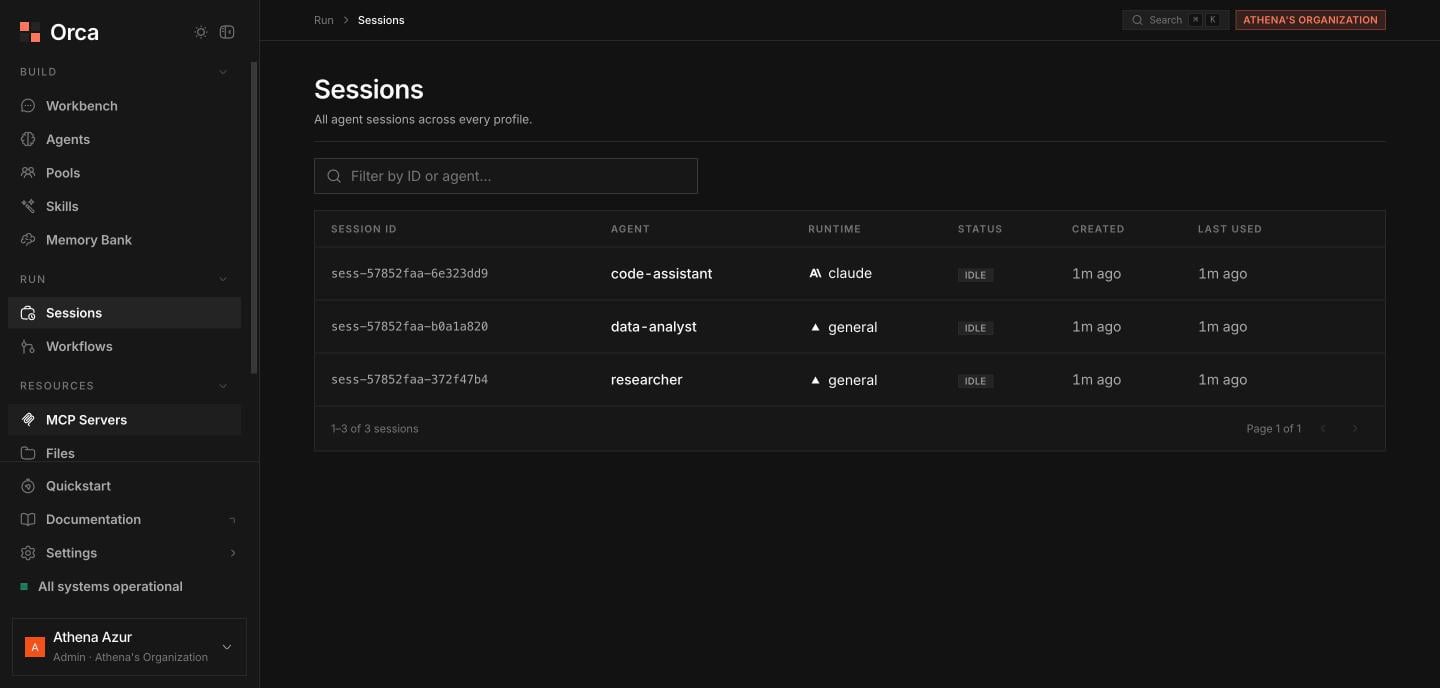
The **Sessions** screen lists every [session](/concepts/sessions) across all your agents in one place. A session is a persistent conversation context that an agent's [runs](/concepts/runs) execute within. The list **auto-refreshes** so live sessions stay current.
## The sessions table
With **filter/search** and pagination, the table shows:
| Column | Description |
| -------------- | --------------------------------- |
| **Session ID** | Stable identifier. |
| **Agent** | The agent the session belongs to. |
| **Runtime** | `claude`, `codex`, or `general`. |
| **Status** | Current session status. |
| **Created** | When the session started. |
| **Last used** | Most recent activity. |
### Actions
* **Shut down session** — from each row's menu, with a confirmation prompt.
* Click a row to open its **detail sheet**.
 ## Session detail sheet
The detail sheet centers on the session's runs:
Jump the whole session into the [Workbench](/dashboard/workbench) to interact with it live.
Browse the paginated **runs list** with a status filter: **all**, **running**, **ok**, **error**, **cancelled**, or **interrupted**.
Select a run to switch between two views — **Stream** (the live event stream) and **Timeline** (the run timeline). You can also open the individual run in the Workbench.
The resource summary also shows a **Sandbox worker** card when the session has
one, including its substrate, lease state, worker ID, and start age. Static
profiles and sandbox-worker sessions whose first run has not launched a worker
have no card. The worker lookup refreshes every five seconds while the sheet is
open.
## Related
The session model in depth.
What a run is and its statuses.
Continue a session interactively.
## Session detail sheet
The detail sheet centers on the session's runs:
Jump the whole session into the [Workbench](/dashboard/workbench) to interact with it live.
Browse the paginated **runs list** with a status filter: **all**, **running**, **ok**, **error**, **cancelled**, or **interrupted**.
Select a run to switch between two views — **Stream** (the live event stream) and **Timeline** (the run timeline). You can also open the individual run in the Workbench.
The resource summary also shows a **Sandbox worker** card when the session has
one, including its substrate, lease state, worker ID, and start age. Static
profiles and sandbox-worker sessions whose first run has not launched a worker
have no card. The worker lookup refreshes every five seconds while the sheet is
open.
## Related
The session model in depth.
What a run is and its statuses.
Continue a session interactively.