> ## Documentation Index
> Fetch the complete documentation index at: https://docs.orcapods.ai/llms.txt
> Use this file to discover all available pages before exploring further.
# Audit
> Review agent lifecycle and configuration changes with before/after diffs.
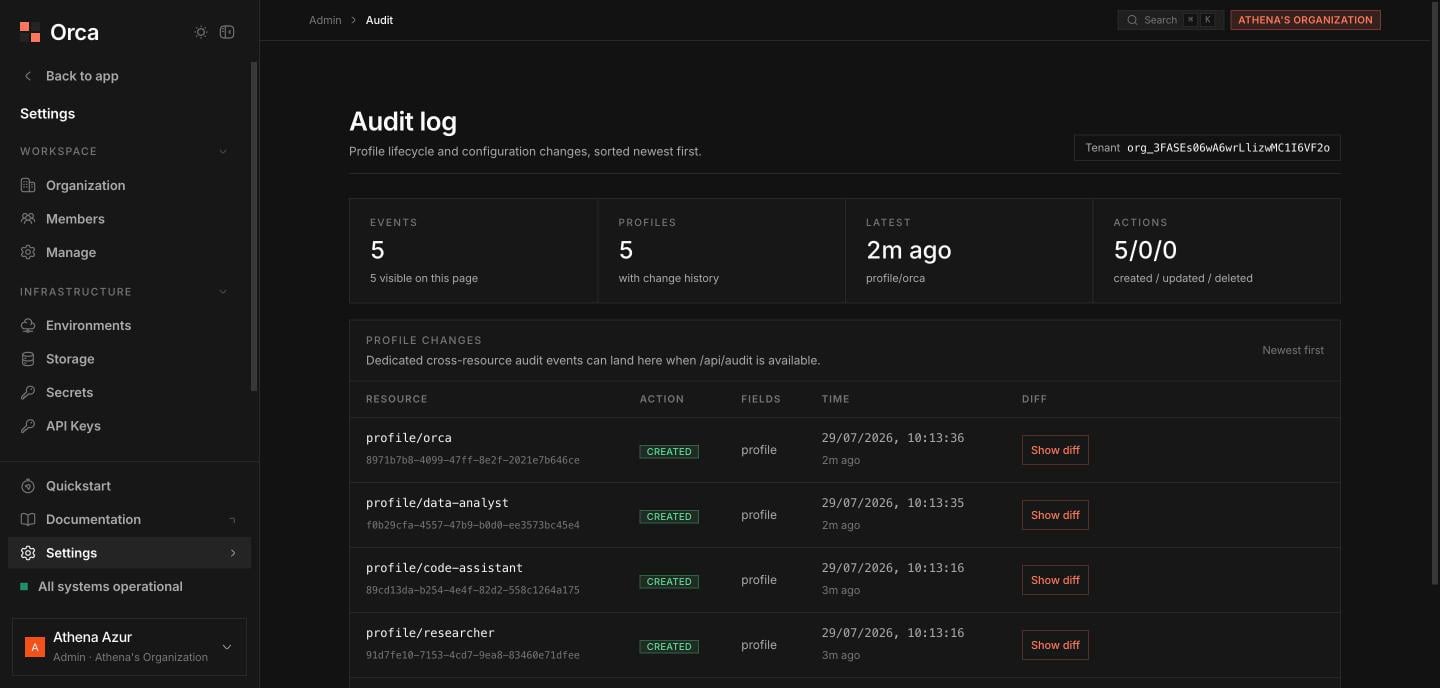
The **Audit** screen is the history of **agent lifecycle and configuration changes** — who created, updated, or deleted agents, and exactly what changed. Use it to trace a regression back to a config change or to review recent activity.
## Summary
Summary cells sit at the top: total **events**, distinct **agents** touched, the **latest** event, and counts of **created**, **updated**, and **deleted** changes.
 ## Changes table
A **paginated table** lists each change:
| Column | Meaning |
| ------------------ | -------------------------------------- |
| **Resource** | The agent (or resource) that changed. |
| **Action** | A badge — created / updated / deleted. |
| **Changed fields** | Which fields were affected. |
| **Time** | When the change happened. |
## Diffs
Click **Show diff** on a row to open a **right-side sheet** with **before** and **after** JSON panes side by side, and **changed-field chips** highlighting exactly what moved.
## Related
The agent profiles these changes apply to.
Roles and who can change what.
## Changes table
A **paginated table** lists each change:
| Column | Meaning |
| ------------------ | -------------------------------------- |
| **Resource** | The agent (or resource) that changed. |
| **Action** | A badge — created / updated / deleted. |
| **Changed fields** | Which fields were affected. |
| **Time** | When the change happened. |
## Diffs
Click **Show diff** on a row to open a **right-side sheet** with **before** and **after** JSON panes side by side, and **changed-field chips** highlighting exactly what moved.
## Related
The agent profiles these changes apply to.
Roles and who can change what.